
How to Handle Missing Receipts for Travel Expense Reports
Losing receipts while traveling for work can delay reimbursements or even lead to out-of-pocket costs. Here's how to handle the situation effectively:
- Request duplicates: Contact vendors like hotels, airlines, or restaurants for replacement receipts. Have transaction details ready, such as the date, amount, and payment method.
- Use bank statements: Highlight relevant transactions and add notes about the business purpose. This works for smaller expenses but may not suffice for detailed costs like lodging.
- File an expense affidavit: If receipts can’t be replaced, submit a signed affidavit explaining the missing documentation and expense details. Check your company’s policy for approval.
- Claim per diems: For meals and incidentals, use IRS-approved daily rates instead of tracking individual receipts.
- Provide alternative proof: Use travel itineraries, email confirmations, or meeting schedules to support your claim.
To avoid future issues, digitize receipts immediately using tools like EasyTripExpenses. These platforms help store, organize, and submit receipts efficiently while reducing errors. Always review your company’s reimbursement policies to ensure compliance.
Why Receipts Get Lost
Common Ways Receipts Get Lost
For business travelers, losing receipts is almost a rite of passage. Small, easily misplaced paper receipts often disappear into the abyss of bags, wallets, or even hotel room drawers. On top of that, paper receipts are fragile - they fade over time, crumple in pockets, or fall victim to accidental water spills. And then there’s human error: in the rush of catching a flight or wrapping up a meeting, travelers might forget to ask for a receipt or accidentally mix business receipts with personal ones.
These days, many vendors are shifting to digital receipts, which adds another layer of complexity. Travelers need to remember to request and save these electronic copies. All these factors can wreak havoc on reimbursement processes and even pose challenges during audits.
"Especially during business trips, receipts have a tendency to get lost or destroyed, become illegible or otherwise unusable." - Jihane Karym, Mobilexpense
What Happens When Receipts Are Missing
The fallout from missing receipts can be frustrating. Without proper documentation, reimbursements are delayed as employees scramble to contact vendors or fill out affidavits. In some cases, companies might outright deny reimbursement, leaving employees to foot the bill themselves - a tough pill to swallow after a work trip.
It gets even more serious when audits come into play. The IRS requires receipts for any expense over $75. If receipts are missing, deductions may be disallowed during a tax audit, creating potential financial headaches for both employees and companies. While some organizations allow internal affidavits to replace lost receipts, these don’t always cut it for VAT recovery or with tax authorities, who often insist on original documentation.
"Acceptance of [a Lost Receipt Affidavit] in lieu of the original receipt/invoice is at the discretion of the employee's manager and Account Payable." - AP Now
sbb-itb-386cb5b
How to add a missing Receipt Declaration on Concur

How to Handle Missing Receipts: Step-by-Step
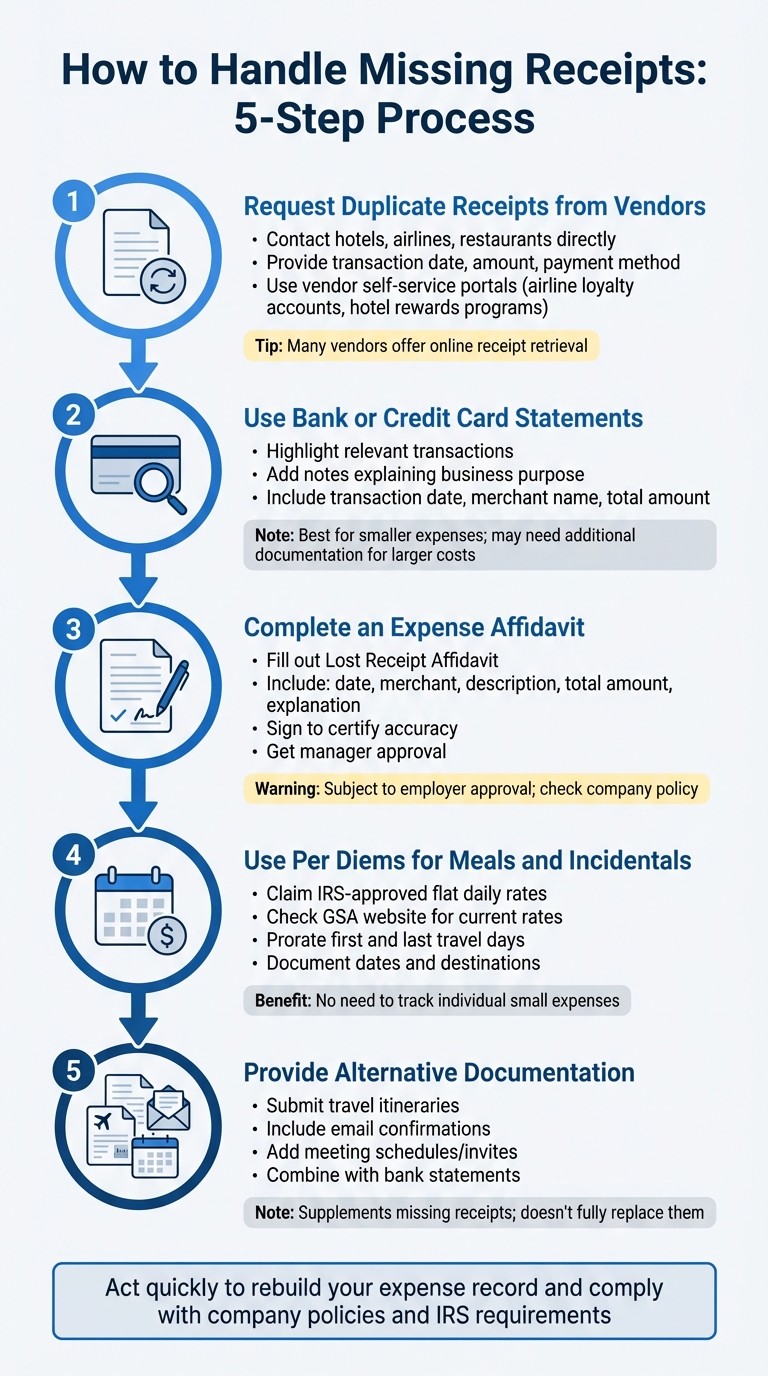
5-Step Process for Handling Missing Travel Expense Receipts
When a receipt is lost, it’s essential to act quickly to rebuild your expense record and comply with both company policies and IRS requirements.
Here’s how to document missing expenses effectively.
Step 1: Request Duplicate Receipts from Vendors
Start by reaching out to the vendor. Many businesses - like hotels, airlines, rental car companies, and restaurants - can issue duplicate receipts if you provide key details. Keep the transaction date, exact amount, and the last four digits of your credit card ready to help them locate your purchase.
For accommodations, flights, car rentals, and meals, contact the vendor directly through their customer service or online portals. If it’s a conference registration, request a payment confirmation from the event organizers.
Many vendors now offer self-service options for retrieving receipts. For example, you can often find past receipts through airline loyalty accounts, hotel rewards programs, or rental car company portals. These tools make it easier to access your records without waiting on customer service.
"To be accepted as proof of an expense, invoices and receipts must include the following information: Date of purchase, Merchant name, Description of purchase, VAT amount (if the purchase is subject to VAT)." - Mobilexpense
Step 2: Use Bank or Credit Card Statements
If you can’t get a duplicate receipt, your bank or credit card statement can help. These statements include the transaction date, merchant name, and total amount, which can serve as evidence of payment. However, they usually lack itemized details, which the IRS often requires for certain expenses.
To strengthen your claim, highlight the transaction on your statement and add a note explaining the business purpose. While this method works best for smaller expenses, you may still need to combine it with additional documentation - like travel itineraries or email confirmations - for larger or itemized costs like lodging or meals.
"An accountable plan requires three elements: a business connection, timely substantiation with receipts and documentation, and return of excess advances." - Emburse
It’s important to note that while statements might suffice for internal reimbursements, tax authorities often require original receipts for VAT recovery.
Step 3: Complete an Expense Affidavit
If neither duplicate receipts nor bank statements are enough, you might need to fill out an expense affidavit (sometimes called a "Lost Receipt Affidavit"). This signed statement explains the missing receipt and confirms the expense details.
Include the date, merchant, description, total amount (including tax), and a brief explanation of why the receipt is unavailable. Then, sign the affidavit to certify its accuracy.
"To claim expenses without a receipt or invoice, you will often need to explain the reason for the missing evidence and provide a signed statement justifying the expense and asserting that the amount is correct. This signed statement is known as an affidavit." - Jihane Karym, Mobilexpense
If your company uses expense management software, check for a "Missing proof of purchase" feature that may generate a digital affidavit automatically. Keep in mind, though, that using affidavits is subject to your employer’s approval, so review your company’s policy before submitting your expense report.
For smaller expenses where affidavits aren’t sufficient, consider applying per diem rates for meals and incidentals.
Step 4: Use Per Diems for Meals and Incidentals
When meal and incidental receipts are missing, per diem rates can simplify the process. Instead of tracking individual expenses, you can claim a flat daily rate based on IRS guidelines. These rates vary, so check the current rates on the GSA website.
To stay compliant, use per diems only for business travel days and prorate the rate for the first and last days of the trip when required. Per diems are especially helpful for multi-location travel or when keeping track of every small expense becomes impractical. Just make sure to follow your company’s per diem policy and document the dates and destinations of your trip.
Step 5: Provide Alternative Documentation
If no other options work, alternative documentation can support your expense claim. Examples include travel itineraries, email confirmations, meeting schedules, or booking details.
For instance, email confirmations from airlines, hotels, or rental car companies often include key details like booking dates and costs. Travel itineraries verify your trip schedule, while meeting invites and agendas show the business purpose of your travel.
Combine these documents with your bank or credit card statement to create a thorough record for auditors. Remember, this approach supplements missing receipts or affidavits but doesn’t replace them entirely. Always check your company’s guidelines to ensure alternative documentation is acceptable.
Using Digital Tools to Prevent Lost Receipts
Losing receipts can be a headache, but digitizing them right away can save you from the hassle. Digital tools allow you to capture and store receipts the moment you receive them, reducing the risk of misplacing them. Combining these tools with traditional methods can improve how you manage expenses overall.
Digitize Receipts with EasyTripExpenses
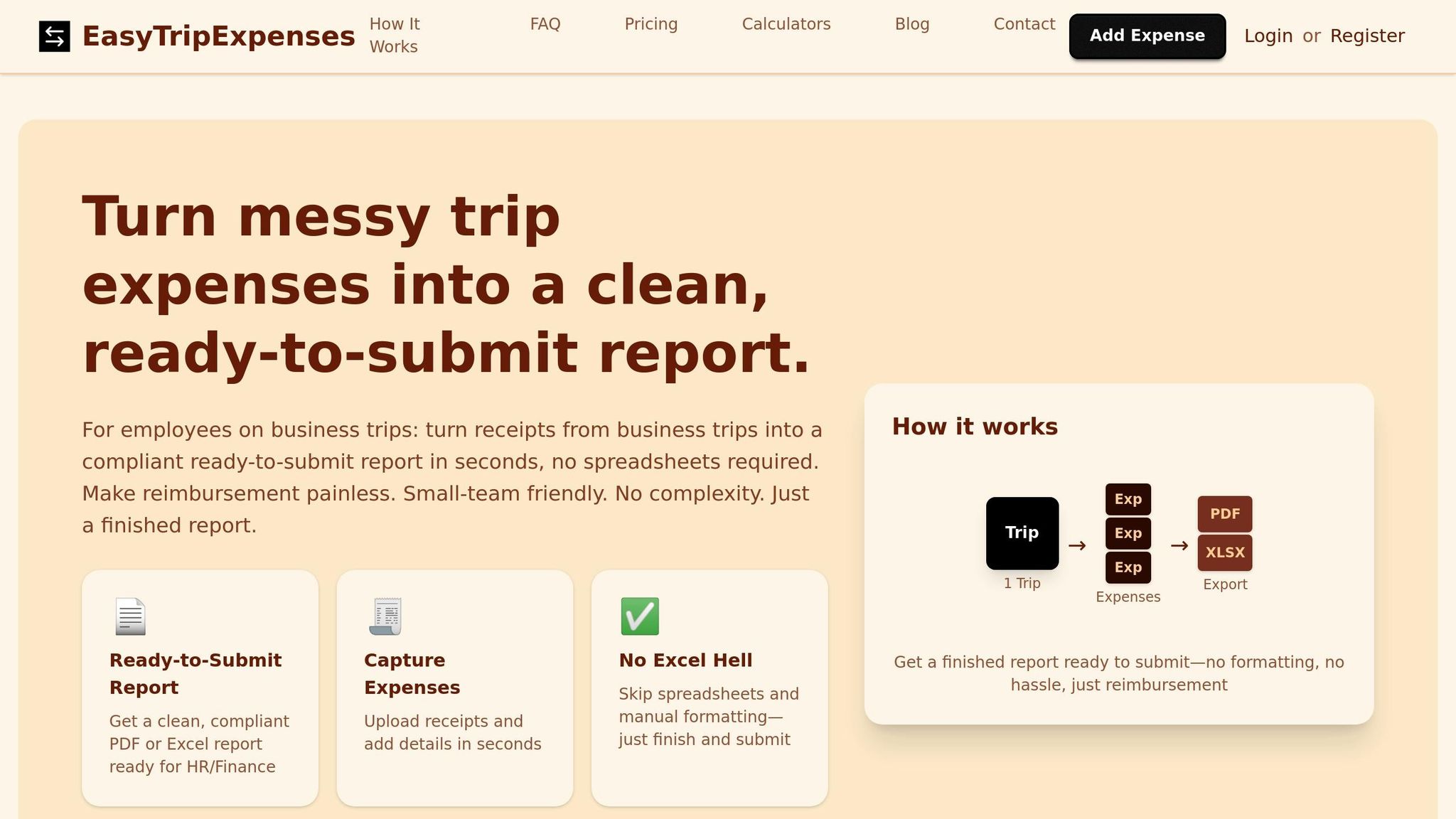
EasyTripExpenses makes managing travel receipts effortless. Whether you have a physical receipt or a digital one, this platform lets you upload images or PDFs instantly. Once uploaded, the tool categorizes your expenses and even generates ready-to-submit PDF or Excel reports. For international travelers, it handles automatic currency conversion, so you don’t have to worry about exchange rates. Plus, with secure cloud storage, you can access your receipts from anywhere - whether you’re at the airport, in a meeting, or back at your desk.
No more digging through your bag for lost papers or hunting for emails. EasyTripExpenses simplifies your process, especially when traveling internationally, where exchange rates can complicate manual calculations.
"Mobile apps... allow them to scan their proof of purchase immediately, thus decreasing the probability of receipt loss or destruction." - Jihane Karym, Mobilexpense
For best results, snap a photo of your receipt right after each transaction. Make sure the image clearly shows the merchant name, date, and total amount. If you receive digital receipts via email - like from airlines or rideshare services - upload them to EasyTripExpenses as soon as possible.
Why Digital Expense Management Works Better
Digitizing expenses doesn’t just protect your receipts - it also reduces errors and speeds up reimbursements. With everything securely stored in the cloud, you can say goodbye to faded, torn, or misplaced paper receipts. Plus, digital storage makes audits or accounting reviews much easier by keeping records organized and searchable.
Manual expense reporting is often riddled with errors. In fact, 49% of manual reports contain mistakes, and fixing just one can cost $52 and 18 minutes of your finance team’s time. Digital platforms tackle this issue by automating data entry, which reduces mistakes and organizes your information. Companies that use automated expense tools report 71% faster reimbursement cycles and 75% more accurate financial data.
Another bonus: digital tools help you stick to IRS guidelines. While the IRS doesn’t require receipts for expenses under $75, lodging always requires a receipt, no matter the cost. Digital platforms ensure that every expense is properly documented, simplifying audits. And since the IRS requires receipts to be kept for at least 3 years (with many experts suggesting 7 years for extra protection), cloud storage is far more reliable than filing cabinets.
Know Your Company's Missing Receipt Policy
Before submitting your expense report, take a moment to review your company’s missing receipt policy. Knowing these rules upfront can save you from delayed reimbursements and unnecessary back-and-forth with your finance team.
Most businesses align with the IRS "accountable plan" guidelines. These rules require you to prove the business purpose of each expense, submit documentation promptly, and return any excess funds to keep reimbursements tax-free. That said, many employers enforce stricter internal protocols. These can include specifying which expenses always need receipts, deadlines for documentation, and when affidavits are acceptable. Understanding these specifics will help you navigate the process more efficiently.
Standard Company Requirements for Missing Receipts
In most cases, companies expect you to request a duplicate receipt as soon as possible. Vendors are generally willing to provide replacements upon request [2, 4]. Whenever possible, a vendor-issued receipt is preferred over using an affidavit.
If a duplicate receipt isn’t an option, you may need to fill out a Lost Receipt Affidavit [5, 2]. This document explains the expense and confirms its accuracy. Typically, your manager will also need to sign it to verify that the expense was reasonable and business-related. Be aware that finance teams often track how frequently affidavits are submitted, which could lead to follow-up questions or delays in reimbursement.
For certain high-risk expenses like lodging, airfare, vehicle rentals, and registration fees, receipts are always required. If you fail to submit documentation within the specified deadline - often within 10 business days - the expense may be classified as personal and denied.
Small Expense Thresholds and Exceptions
While most companies have strict documentation requirements, there’s often more flexibility for smaller expenses. The IRS mandates receipts for expenses over $75 (except for lodging, which always requires one), but your employer might set a lower threshold, such as $25 or $75, where a bank statement or simple log may suffice. This leniency is typically extended to employees who consistently maintain good documentation habits.
"The IRS requires receipts for all lodging expenses, regardless of amount. Even a $30 hotel stay needs documentation." – Lindsey Revill, Marketing at Expensify
To avoid surprises, check your company’s expense policy or quick reference guide to confirm the exact thresholds. Even if receipts aren’t required for small amounts, it’s a good idea to keep detailed records. A simple log noting the date, vendor, amount, and business purpose can go a long way. Remember, just because the IRS allows some flexibility doesn’t mean your employer does. Many companies require receipts for every dollar spent to ensure tighter financial oversight and audit readiness.
How EasyTripExpenses Simplifies Compliance
Keeping up with company expense policies can feel like a chore, especially when it involves endless manual data entry and formatting. EasyTripExpenses takes the hassle out of the process, helping you stay compliant without the headache. It simplifies documenting expenses - even when receipts are missing - and creates audit-ready reports that meet the standards of your finance team.
EasyTripExpenses Features for Missing Receipts
Lost a receipt? No problem. EasyTripExpenses has you covered. With its manual entry feature, you can record key details like the date, vendor, amount, and business purpose. This is a lifesaver when dealing with vendors who don’t issue receipts or when a physical copy goes missing during travel.
The platform also includes a comment field, where you can explain situations like "vendor did not issue receipt" or "receipt misplaced during travel." These notes provide clear justifications that align with finance documentation requirements. Plus, built-in tools like categorization, AI-powered audits, and automatic currency conversion ensure that even manually entered expenses meet reporting standards. This combination not only keeps you compliant but also makes the process much faster.
Save Time and Reduce Errors with EasyTripExpenses
Manual data entry is not just tedious - it’s error-prone. For example, logging expenses in Excel typically takes about 3 minutes per entry. With EasyTripExpenses, that time drops to just 30 seconds, saving you an average of 2.5 minutes per expense. Multiply that by a dozen expenses from a week-long trip, and you’ve saved more than half an hour.
"In seconds, we can track every business trip expense, stay organized, and stop losing time (and reimbursements)." – Liduo Mo, Travel Agent
The platform also eliminates formatting headaches by generating ready-to-use PDF or Excel reports for HR and finance. These clean, compliant documents can be submitted immediately, avoiding costly errors. Correcting a single expense report mistake can cost up to $58 and take 18 minutes to fix, so getting it right the first time is a big win for everyone.
With a web-based interface that works on desktops, tablets, and mobile browsers, you can log expenses on the go - right when they happen. No more forgetting details or misplacing receipts. Plus, all data is secured with industry-standard HTTPS/TLS encryption, so your financial information stays safe. The result? Audit-ready expense reports that meet HR and finance requirements without breaking a sweat.
Conclusion
Misplacing a receipt doesn’t have to derail your reimbursement process. The key is acting fast to document the loss. Start by requesting a duplicate receipt from the vendor or using bank and credit card statements as proof of purchase. If those options aren’t available, a detailed missing receipt affidavit can serve as a backup. Make sure you’re familiar with your company’s policies, especially regarding minimum thresholds like the common $50 limit for non-travel expenses. Knowing these policies ensures you can provide acceptable alternative documentation when needed.
To prevent future headaches, consider incorporating digital tools into your routine. Digitizing receipts as soon as you get them is a simple yet effective way to avoid loss or damage. Platforms like EasyTripExpenses make this process straightforward by allowing you to upload receipts directly from your mobile browser at the point of sale. The tool also offers features like manual entry for missing receipts, comment fields for explanations, and automatic currency conversion. Plus, it saves time - cutting the process from 3 minutes per expense to just 30 seconds, which makes a big difference during a busy trip. By combining these digital solutions with timely manual actions, you can streamline expense management and minimize future issues.
Keep in mind, however, that while affidavits may work for internal reimbursements, tax authorities typically require original receipts for VAT recovery. Always double-check your company’s and tax policies before relying on alternative documentation. And remember, only the payee is authorized to complete a missing receipt declaration.
FAQs
Will my expense be denied without a receipt?
If you’ve lost a receipt, your expense might still be reimbursed if you submit alternative documentation. This could include a lost receipt affidavit or duplicate proof of the transaction, like a bank statement or credit card record. Many organizations are more flexible with expenses under $75, but reimbursement policies can differ widely. Be sure to review your company’s specific rules to stay compliant.
What should a missing receipt affidavit include?
A missing receipt affidavit serves to confirm that an expense is both legitimate and adheres to company policies. It usually outlines key details such as the expense date, vendor name, amount, and location, along with a statement declaring that the receipt is lost or cannot be provided. The document also affirms that the expense was a valid business transaction. To ensure accuracy and compliance, it often requires digital signatures from the employee and, in some cases, their supervisor.
What proof can replace a missing receipt for audits?
If you've lost a receipt, you can use a Missing Receipt Affidavit as a substitute. This form needs to include key details like the expense description, the amount spent, why the receipt is missing, and signatures from both you and your manager. To strengthen your claim, you can also attach alternative proof, such as credit card statements or booking confirmations. Make sure the affidavit is thorough and precise to satisfy audit standards.