
Ultimate Guide to Avoiding Travel Expense Report Errors
Mistakes in travel expense reports are more common than you think - and they’re costly.
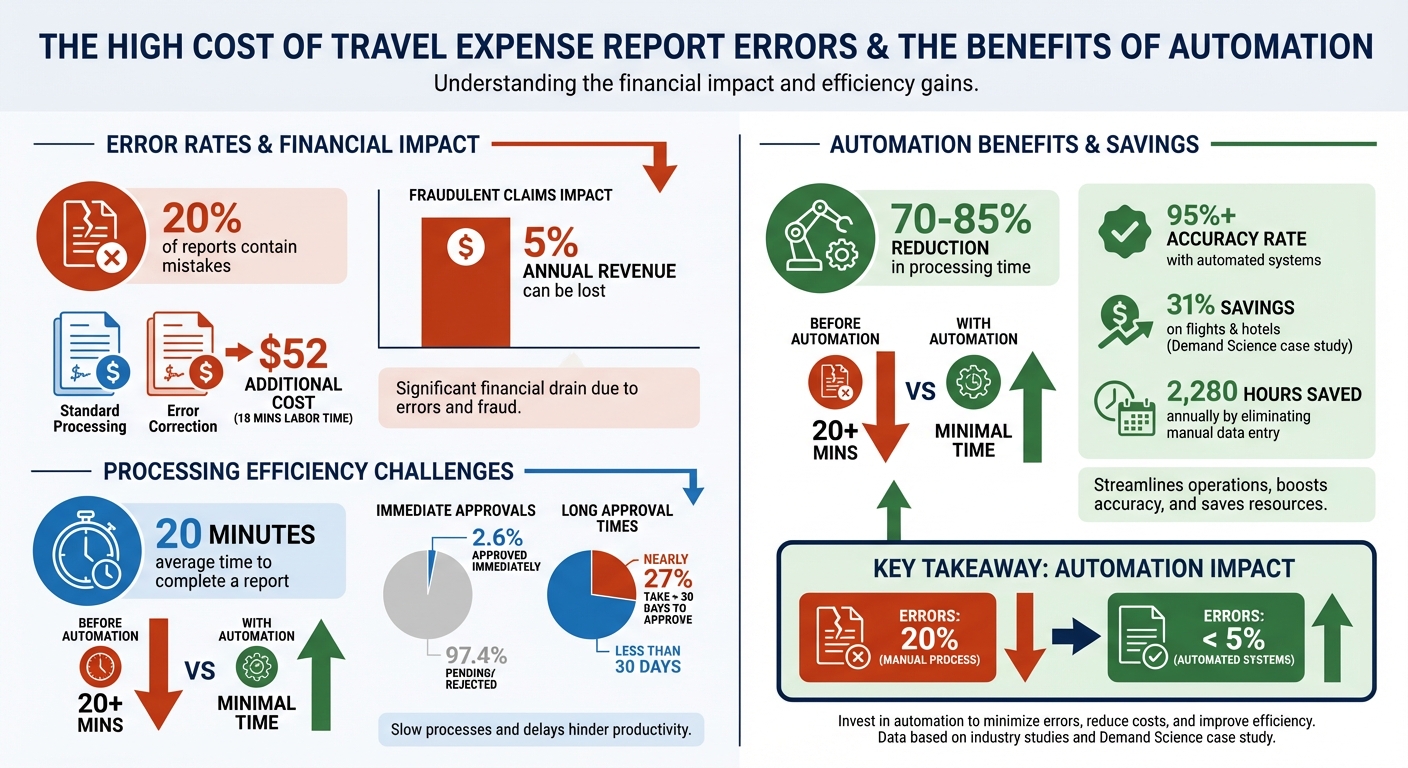
Errors affect accuracy, tax compliance, and employee reimbursements, with 20% of reports containing mistakes and corrections costing $52 per report. Plus, fraudulent claims can drain up to 5% of annual revenue.
This guide provides practical solutions for common issues like duplicate submissions, misclassified expenses, and missing documentation. Learn how to streamline reporting with tools like automation, reduce processing time, and avoid compliance headaches. Here’s what you’ll take away:
- Common errors: Duplicate receipts, misclassified expenses, and policy violations.
- How to prevent mistakes: Use digital receipt storage, AI-powered categorization, and clear documentation.
- Automation benefits: Save time and cut errors with tools like OCR and centralized expense platforms.
- Submission tips: Verify every detail, follow company policies, and submit within deadlines.
Travel Expense Report Error Statistics and Cost Impact
Common Travel Expense Report Errors and How to Avoid Them
Understanding where things can go wrong is the first step toward smoother, faster expense reporting. Below are some of the most frequent mistakes professionals encounter - and tips to help you steer clear of them.
Duplicate Submissions
Submitting the same receipt more than once is a common issue, often caused by manual tracking or a lack of real-time reconciliation.
How to avoid it: Save each receipt as soon as you receive it in a dedicated digital folder. Before submitting your report, compare your entries against your corporate card statement. Many modern expense platforms can automatically flag duplicate entries by checking merchant names, dates, and amounts. Also, ensure every expense is categorized correctly to keep reports accurate.
Misclassified Expenses
Misplacing expenses - like listing a client dinner under "office supplies" or a hotel stay under "transportation" - can throw off budget tracking and even lead to tax compliance issues.
How to avoid it: Familiarize yourself with your company’s standard expense categories before starting your report. If you’re unsure, confirm with your finance team. Expense tools with AI-powered categorization can automatically assign expenses using merchant codes, reducing manual errors. Add detailed notes (e.g., "Dinner with Client X to discuss Q2 renewal") to clarify the purpose of each expense. Always maintain thorough records to back up your entries.
Incomplete or Missing Documentation
Lost receipts or unclear images are common problems. The IRS requires complete documentation for travel-related deductions, making accurate records essential for reimbursements.
How to avoid it: Take a photo of each receipt as soon as you receive it to prevent loss or damage. Ensure every receipt includes key details: vendor name, date, location, itemized description, total amount, and payment method.
| Expense Category | Documentation Required |
|---|---|
| Airfare | Receipt showing carrier, class of service, and comparable quotes for upgrades |
| Lodging | Itemized receipt/folio and proof-of-stay (especially for third-party bookings) |
| Group Meals | Itemized receipt, business purpose, and list of attendees |
| Ground Transport | Receipts required if the roundtrip cost exceeds $75 |
Out-of-Policy Spending
Booking unapproved accommodations or exceeding meal limits can lead to budget overruns and disputes with the finance team.
How to avoid it: Always confirm spending limits before making bookings. Familiarize yourself with per diem rates, approved lodging standards, and flight categories. Real-time policy enforcement tools can help catch violations as they happen.
Mixing Personal and Business Expenses
Using the same credit card for both personal and business travel expenses can create confusion and delay reimbursements. Including personal charges in your report may also trigger audit concerns.
How to avoid it: Keep personal and business expenses separate by using different cards. If you must use one card for both, carefully itemize your transactions and exclude personal charges from your report. If a personal expense accidentally lands on your corporate card, flag it immediately and arrange for a manual adjustment instead of categorizing it as a business expense.
Best Practices for Receipt Collection and Documentation
Getting into the habit of managing receipts properly can save you a lot of time and hassle later. The trick is to deal with receipts as soon as you get them.
Digital Receipt Storage Methods
The easiest way to keep track of receipts is to snap a photo right after you receive one. Waiting increases the chances of losing or damaging it. Use your phone's camera or a mobile app with optical character recognition (OCR) to ensure you capture a clear image on the spot.
For digital receipts, forward them immediately to a specific email address dedicated to expense tracking. This way, you’re creating a centralized digital archive before you even leave the store or vendor. To make this process even smoother, platforms like EasyTripExpenses can help organize and categorize receipts automatically.
If you’re traveling abroad, convert foreign currency amounts into U.S. dollars using a trusted tool like the OANDA Currency Converter. Then, attach a copy of the exchange rate page to your records. Tagging expenses with project codes or client names as you go can also save time and ensure accuracy when it’s time to submit reports or allocate costs.
Ensuring Receipt Accuracy and Completeness
Once you’ve safely stored your receipts, take a moment to ensure they include all the necessary details. A proper receipt should list the vendor's name, total amount (including tax), date, location, and an itemized breakdown of the purchase. Keep in mind that standard credit card slips often don’t provide enough detail to distinguish reimbursable items, like a hotel room charge, from personal expenses, such as minibar purchases.
Before uploading receipts, make sure to blur or hide sensitive information, such as Social Security numbers, full credit card numbers (leave only the last four digits), bank details, or home addresses. This step helps protect your privacy and reduces the risk of fraud.
For hotel stays, request a digital folio at checkout instead of relying on paper copies. If you booked through a third-party service like Expedia, ask the hotel front desk for a "zero-balance folio" or a signed confirmation of your stay. To make retrieval easier later, use consistent file names, such as Vendor_Location_Name_Date.pdf.
What to Do When Receipts Are Missing
Even with the best intentions, receipts sometimes go missing. Here’s how to handle it. For recent or high-value purchases, try contacting the merchant for a duplicate invoice. Many vendors keep transaction records for a certain period and can reissue receipts upon request. If that’s not possible, use your bank or credit card statement as proof of the transaction.
If your organization requires it, complete a "Missing Receipt Affidavit" or similar form when the original receipt is lost. This document typically includes your name, address, signature, and all relevant purchase details - like the vendor, date, amount, and business purpose. Keep in mind that missing receipt claims often require managerial approval before you can be reimbursed.
Also, check your company’s policy regarding receipt thresholds. For instance, the IRS and many businesses only require receipts for expenses over $75. For smaller amounts, detailed notes or a bank statement might be enough. However, for some accounts - like sponsored projects - expenses without itemized receipts may need to be marked as "non-recoverable", meaning you can’t charge them to those accounts.
To avoid these headaches entirely, consider using direct billing for major expenses like hotels and rental cars. This method eliminates the need to collect receipts manually, as the charges are sent straight to your company’s expense management system.
Using Automation to Reduce Travel Expense Errors
Mistakes in travel expense reporting can be costly and time-consuming, but automation offers a practical way to reduce these issues and boost efficiency. Manual expense reporting is notoriously prone to errors - about 20% of manual travel expense reports contain mistakes or missing details. Fixing these errors takes an average of 18 minutes and costs companies an additional $52 per report. These numbers underscore why automation isn't just a convenience - it’s a smart financial move. Let’s dive into how automation tackles these challenges with precision.
Automated Categorization and Policy Enforcement
Getting every expense categorized correctly can be tricky. Think about it: Is that Uber ride logged under transportation? Was that dinner tagged as a meal expense? Automation simplifies this process by automatically assigning expenses to the right categories - like meals, lodging, or transportation - using merchant category codes and historical company data.
Plus, automated systems enforce your company’s spending policies in real time. If an expense goes over the per-diem limit or comes from an unapproved vendor, the system flags it immediately. This ensures policy violations are addressed before they become a problem. For example, in November 2023, Demand Science introduced an automated expense platform, which led to 31% savings on flights and hotels by improving compliance and visibility. Ivan Osotrio, Director of Accounting at Demand Science, shared:
"Submitting and approving expenses is so much faster, and we no longer have to deal with errors in spreadsheets".
OCR Technology for Receipt Management
Manually entering receipt data is tedious and prone to mistakes. That’s where Optical Character Recognition (OCR) technology steps in. OCR extracts key details - like dates, vendor names, and totals - directly from receipt images, eliminating the need for manual input. All you have to do is snap a photo, and the software handles the rest. Tools like EasyTripExpenses use OCR to auto-fill expense details, potentially saving businesses an estimated 2,280 hours annually by cutting out manual data entry.
Centralized Expense Management Platforms
When expense records are scattered across emails, paper files, and personal folders, it’s nearly impossible to catch duplicates or spot anomalies. A centralized expense management platform solves this by consolidating all expense data in one place. This allows managers to access real-time dashboards, track spending trends, and flag unusual activity quickly.
For instance, EasyTripExpenses offers a centralized solution with features like automatic currency conversion and full trip history tracking. This streamlined system makes it easier to review, approve, and reimburse expenses, cutting down on errors and speeding up the entire process - all without requiring complex IT setups.
sbb-itb-386cb5b
Guidelines for Reviewing and Submitting Expense Reports
Even with automated systems reducing manual errors, a final human review is essential. Simple mistakes can slip through, and a quick self-check before submission can save hours of back-and-forth with managers or finance teams. On average, completing an expense report takes 20 minutes and costs $58 to process. If rejected, correcting it adds another 18 minutes and $52 in labor costs. Getting it right the first time is not just efficient - it's cost-effective.
Self-Verification Checklist for Employees
Before submitting your expense report, take a few moments to verify every detail. Start by ensuring each line item matches its receipt. Receipts should include clear images showing the vendor name, date, and an itemized list of costs. Avoid vague descriptions - use the "Who, What, Where, Why" rule to explain the expense. For example: "Dinner with Sarah Chen, VP of Procurement at Acme Corp, to discuss Q3 contract renewal" meets the IRS Publication 463 requirements.
Check that your expenses align with company per-diem limits and approved vendor lists. Also, confirm that each expense is categorized correctly - like distinguishing between meals and entertainment - as this can impact tax deductibility. Look out for duplicate entries or personal charges mistakenly added to your corporate card. For international travel, ensure the correct exchange rates are applied. Lastly, tag expenses with the right project codes or department labels to help your finance team allocate budgets accurately.
Once you've completed your self-check, your manager should provide a second review to catch any overlooked errors.
Best Practices for Manager Review
Managers play a crucial role in spotting potential issues that employees might miss. Watch for patterns like repetitive round-number expenses (e.g., $50.00 or $100.00), which might suggest estimates instead of actual receipts. Be cautious of weekend charges without a clear business purpose or expenses that don’t match their merchant category, such as a "meal" expense from a hardware store. Another red flag is "threshold manipulation" - splitting a large purchase into smaller amounts to avoid approval limits.
A tiered approval process works best: direct managers should first verify the business purpose, followed by finance or accounts payable for compliance and proper categorization. Focus manual reviews on high-risk items like cash purchases, transactions by new employees, or frequent policy violators. These areas benefit from extra scrutiny, complementing automated checks. For instance, Chobani implemented AI-driven tools in 2024 to audit expense reports. According to Finance Systems Specialist Marcy Hagenbuch, the project saved the finance team three to four hours daily and boosted compliance immediately:
"Once we established that we were using Verify and we were going to an AI audit tool, I saw compliance immediately improve. Employees knew that every line item, every expense in every report was going to be reviewed by AI".
If violations occur, reject the report and provide detailed feedback. Most errors stem from misunderstandings, not fraud, so coaching repeat offenders can help reinforce compliance.
Timely Submission and Approval Tips
Delays in submitting expense reports can disrupt forecasts, distort reporting, and slow month-end closings. Submitting on time also ensures employees receive reimbursements quickly. Aim to submit reports within 30 days of the expense - or weekly for better accuracy. Tools like EasyTripExpenses can simplify this process by letting you photograph receipts and autofill details on the spot.
Managers and finance teams can speed up approvals by setting a 48-hour Service Level Agreement (SLA). Keep approval chains short - no more than two levels - to avoid unnecessary delays. Automated reminders sent at seven, three, and one day before deadlines can also keep things moving. Mobile approvals help too, letting managers review and approve expenses from anywhere. Currently, only 2.6% of claims are approved immediately, while nearly 27% take over 30 days. Streamlining workflows can close this gap, making the process smoother for everyone.
To keep things organized, follow these recommended deadlines for different submission types:
| Submission Type | Recommended Deadline | Reason for Deadline |
|---|---|---|
| Corporate Card Charges | 15 Days | Transaction data is already captured; needs prompt reconciliation. |
| Out-of-Pocket Expenses | 30 Days | Prevents employees from floating personal funds for too long. |
| International Travel | 45 Days | Allows time for complex documentation and currency conversion. |
| Standard Business Trip | 14–30 Days | Ensures finance can close books and maintain cash flow visibility. |
Conclusion
Key Points Recap
Errors in expense reports can rack up costs quickly - about $58 per report on average, with an additional $52 for corrections. Manual processes not only have a 20% error rate but also leave organizations vulnerable to fraud, which can drain up to 5% of revenue. Tackling these issues comes down to three essential practices: matching entries to receipts for verification, implementing clear and accessible policies, and using automation to minimize human error.
Verification ensures compliance and flags duplicates before submission. Clear policies act as a safeguard against overspending and compliance violations. Most importantly, automation revolutionizes the process - modern tools can cut processing time by 70–85% while boosting accuracy to over 95%. These strategies lay the groundwork for effective expense management.
Next Steps for Professionals
For professionals, start by using a checklist to confirm that every submission includes attached receipts, correct expense categories, and a clear business purpose. If you're still relying on spreadsheets, consider upgrading to digital tools for efficiency. Platforms like EasyTripExpenses simplify the process by letting you snap photos of receipts, categorize expenses, and produce polished reports in PDF or Excel formats.
Managers can enhance the process by enforcing a 30-day submission deadline for standard trips. This ensures timely expense processing and accurate financial forecasting. Transitioning to automation is another critical step - reclaim valuable time, reduce errors, and streamline reporting. By adopting these practices, you can achieve precise, efficient expense reporting while maintaining control over your organization's finances.
FAQs
How does automation help prevent errors in travel expense reports?
Automation takes the headache out of travel expense reports by cutting down on errors and simplifying data entry. With automated tools, information from receipts, credit card statements, or mileage logs can be extracted and categorized automatically. This reduces the chances of mistakes like misclassifying expenses or overlooking important details. Plus, these systems can flag duplicate entries or inconsistencies, helping ensure everything aligns with company policies and tax regulations.
Another big win? Automation speeds up the entire process. Reports can be created and submitted faster, with all necessary details included. Real-time tracking catches discrepancies early, avoiding delays. By streamlining the workflow, automation not only saves time but also boosts accuracy and reduces the risk of costly mistakes.
How can I effectively manage digital receipts for travel expenses?
Effectively managing digital receipts is essential for keeping expense reporting accurate and staying compliant with regulations. Start by taking clear, readable photos of your receipts right after making a purchase. Whether you use your smartphone or a scanner, this quick step ensures you don’t lose or damage important physical receipts. Make sure each receipt captures key details like the date, vendor name, and an itemized list of charges to meet both IRS and company guidelines.
Store your receipts in a secure and easily accessible system, such as cloud storage or an expense management app. This approach makes it easy to retrieve documents during audits or reimbursement requests. Tools like EasyTripExpenses simplify the process even further by letting you upload receipts, categorize your spending, and create professional reports in no time. By staying organized and using technology, you can reduce mistakes and make expense reporting much smoother.
How can I make sure my expense report follows company policies?
To make sure your expense report meets company policies, start by going through your organization's guidelines. This will clarify which expenses qualify for reimbursement and any specific rules for submitting them.
Always maintain accurate records - receipts and detailed notes are your best friends here. Properly categorizing each expense and using the required submission format is equally important. Submitting your report promptly and double-checking for mistakes can save you from unnecessary delays or rejections.
Additionally, regularly reconciling your expenses and adhering to both company and IRS standards can minimize errors and make the process smoother. Stick to these practices, and you'll consistently produce detailed, compliant expense reports.