

5 Problems with Generic Expense Templates
Generic expense templates may seem like a quick fix for tracking spending, but they often create more issues than they solve. Here’s why they fall short:
- Policy Compliance Issues: Generic templates lack fields for company-specific policies like per diem limits or approval workflows, leading to errors and disputes.
- Team Travel Challenges: They don’t support shared expenses or group travel, making reconciliation messy and time-consuming.
- Currency Limitations: Manual currency conversion increases errors, especially during international trips with fluctuating exchange rates.
- Rigid Categories: Fixed categories don’t align with unique business needs, causing misclassification and extra work for finance teams.
- Manual Data Entry: Entering data manually is slow, error-prone, and costly, with mistakes averaging $50 each to fix.
The Solution: Customizable tools like EasyTripExpenses address these gaps by automating policy enforcement, simplifying team expense tracking, supporting real-time currency conversion, and reducing manual work. These tools save time, improve accuracy, and streamline expense management.
Quick Comparison:
| Factor | Generic Templates | Custom Tools (e.g., EasyTripExpenses) |
|---|---|---|
| Policy Compliance | Manual checks, prone to errors | Automated, policy rules built-in |
| Team Travel Management | Inefficient for group expenses | Supports shared costs and group tracking |
| Currency Support | Manual, error-prone conversions | Real-time exchange rates, automatic updates |
| Expense Categories | Fixed, inflexible | Customizable to fit business needs |
| Manual Workload | High, slow, and error-prone | Reduced via automation and receipt uploads |
If your business struggles with these challenges, upgrading to a custom solution can transform how you manage expenses.
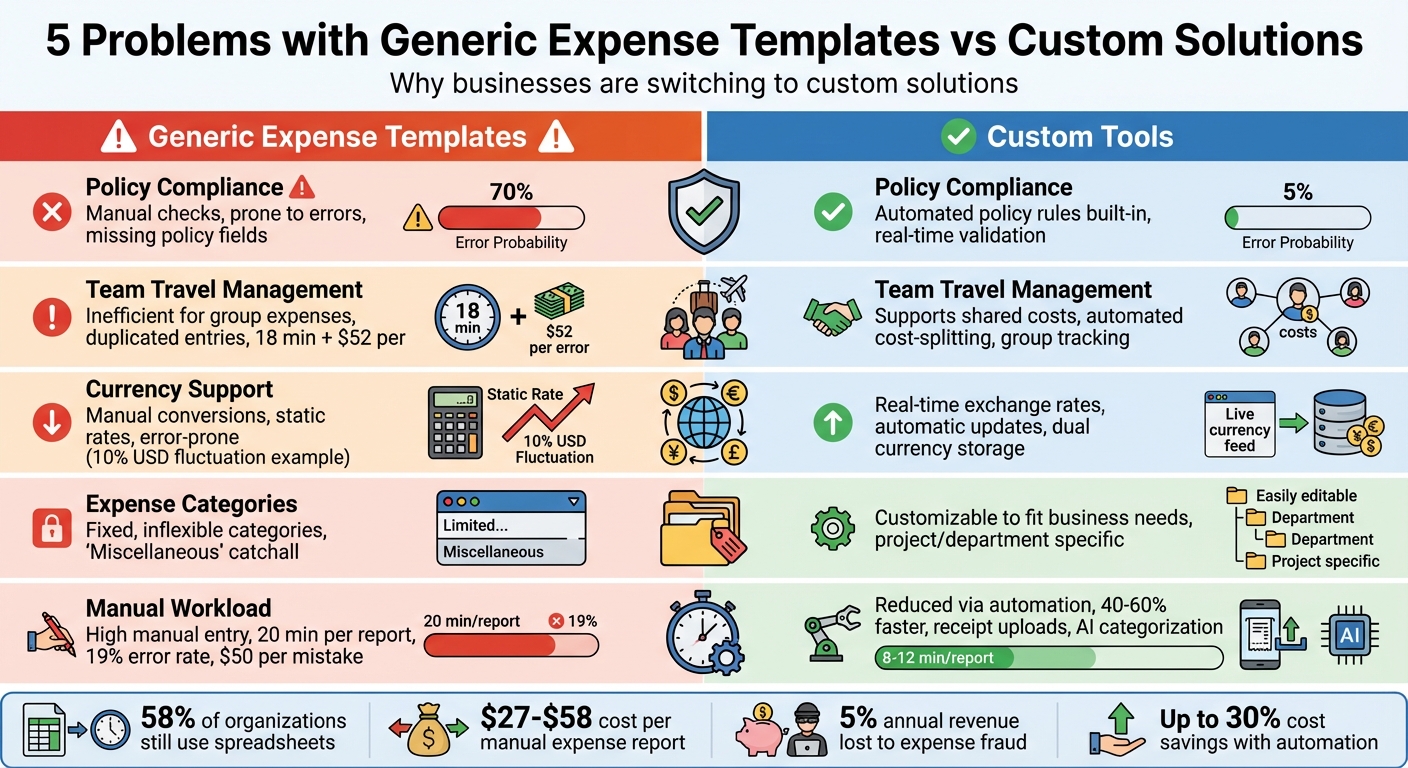
Generic vs Custom Expense Templates: Key Differences Comparison
Problem 1: Generic Templates Don't Match Company Policies
The Shortcomings of Generic Templates
Generic expense templates might cover the basics - fields like date, amount, and vendor - but they often fall short when it comes to including company-specific policy details. Key elements like per diem limits, approval thresholds, cost centers, and project codes are usually missing. This creates a major headache for finance teams, who then have to manually review and cross-check each expense submission.
This manual process not only eats up time but also increases the likelihood of mistakes. Expenses need to be verified against per diem rates, department allocations, and approval requirements, which often leads to confusion, accidental breaches of policy, and reimbursement disputes.
The consequences go beyond operational inefficiencies. Incorrect or delayed reimbursements can leave employees out of pocket or even create tax issues. These problems can erode employee morale, as no one enjoys dealing with financial mishaps caused by unclear or non-compliant processes.
Creating Templates That Align With Policies
The solution lies in using templates that are tailored to your company's specific policies. Custom templates can incorporate all the necessary fields - like cost centers, project codes, department codes, and approval workflows - directly into the submission process. By embedding these policy checks upfront, you eliminate the need for manual verifications later on.
Modern expense management tools make this even easier. Platforms such as EasyTripExpenses allow you to design templates that reflect your company's reimbursement rules and spending limits. With these tools, employees categorize their expenses within a framework that already aligns with company policies. This approach not only speeds up the reimbursement process but also ensures compliance from the beginning, reducing errors and preventing disputes.
Problem 2: Generic Templates Don't Work for Team Travel
Why Generic Templates Fall Short for Team Travel
When employees travel as a group for conferences, client meetings, or team events, generic expense templates often create more problems than they solve. These templates are built on the assumption that each expense is tied to a single individual. But in real-world scenarios, it's common for one person to pick up the tab for a team dinner, another to book a shared rental car, and someone else to handle group transportation costs.
This mismatch leads to messy and inefficient tracking. Despite these challenges, 58% of midsize and large organizations still rely on spreadsheets to manage expense data. For team expenses, this reliance often results in duplicated entries and misallocated costs, making manual reconciliation even more time-consuming. On average, correcting a single expense report due to errors takes up to 18 minutes and costs $52. When multiple team members submit overlapping expenses, the time and money wasted can spiral, leaving finance teams buried in reconciliation work. Clearly, a better system is needed - one designed specifically for shared expenses.
A Smarter Way to Manage Team Expenses
Customizable templates can solve these issues by automating cost-splitting and ensuring shared expenses are allocated accurately. For instance, tools like EasyTripExpenses allow users to upload receipts, categorize expenses, and add notes to provide clarity on shared costs. The platform then generates ready-to-submit reports in PDF or Excel formats, simplifying the entire process.
Additional features like built-in currency conversion and secure data storage make managing complex, multi-person trips far easier. These tools eliminate the manual headaches caused by generic spreadsheets, saving teams both time and effort.
Problem 3: Generic Templates Can't Handle Multiple Currencies
Currency Issues with Generic Expense Templates
Handling expenses during international business trips can quickly become a headache, especially when using generic templates. These templates often require manual currency conversion, which is a recipe for errors. Exchange rates fluctuate daily, and static rates in templates become outdated fast. Imagine dealing with a hotel bill in euros and a taxi receipt in yen - each requiring manual conversion. It’s not just tedious; it’s error-prone.
Here’s a common scenario: one employee uses Monday’s exchange rate, while another applies a different rate later in the week. The result? Inconsistent financial reports that are tough to reconcile. For instance, in early 2025, the US dollar lost nearly 10% of its value against the euro in just four months. Such rapid changes in exchange rates can wreak havoc on expense tracking.
On top of that, manual conversions often lead to rounding errors and mismatched entries, delaying report approvals. Transferring this data from spreadsheets to accounting systems only adds to the risk of mistakes. Finance teams then have to spend hours fixing these errors instead of focusing on more strategic tasks. Clearly, there’s a need for a better solution.
Simplifying Multi-Currency Expense Tracking
Customizable templates offer a smarter way to handle this problem. They automate currency conversion by using real-time exchange rates, ensuring accuracy and consistency. These templates store both the original currency and its converted value, making financial reporting much smoother.
Platforms like EasyTripExpenses take this a step further. They provide built-in currency conversion, so you can upload a receipt in any currency, and the system takes care of the rest. With additional features like receipt uploads, expense categorization, and professional PDF or Excel reports, managing international expenses becomes faster and far less error-prone. It’s a game-changer for teams dealing with multi-currency transactions.
Problem 4: Generic Templates Have Fixed Categories
Why Fixed Categories Create Problems
Generic templates often impose fixed categories that don’t align with the unique needs of different teams. Picture this: a marketing agency might need categories like client projects and creative services, while a construction company could prioritize tracking equipment rentals and site materials. But generic templates lump everyone into the same rigid structure, ignoring these differences.
What happens next? Employees create a catchall "Miscellaneous" category, leading to messy data and extra work for finance teams. These teams then spend hours manually reclassifying expenses, which is both frustrating and costly. On average, processing a single manual expense costs businesses between $27 and $58. Add to that the fact that 19% of expense reports contain errors, and companies spend another $52 per mistake to fix them - costing time and money they can’t afford to waste.
Take MDM Props as an example. In 2024, this arts fabrication company faced significant delays in reconciling expenses due to outdated tracking methods and poorly defined categories. Without clear categorization, they couldn’t get a real-time view of their cash flow, which hurt their ability to manage finances effectively.
How to Create Better Categories and Reports
To address this issue, customizing categories is essential. Unlike generic templates, custom solutions allow businesses to create categories that reflect their actual workflows. For instance, instead of cramming all travel expenses into one vague bucket, you can break them down by department, project, client, or even location. This approach ensures your expense reports provide meaningful insights that align with your operations.
In 2024, ATU, a German automotive company, demonstrated the power of this strategy. By implementing customizable expense categories, they achieved more precise tracking and accurate tax filings, saving over $2 million in taxes.
"Custom categories pinpoint spending and reveal wasteful patterns." – Trish Toovey, Principal Content Manager, Payhawk
Tools like EasyTripExpenses make this process even easier. They let you define expense categories tailored to your team’s needs and generate reports in formats like PDF or Excel. Whether you’re billing clients, preparing for audits, or analyzing spending trends, these tools help you focus on the categories that matter most to your business.
Customizing categories isn’t just a nice-to-have - it’s a must for efficient expense reporting. And as we’ll explore next, manual data entry adds another layer of complexity to this challenge.
Problem 5: Generic Templates Require Too Much Manual Work
Errors from Manual Data Entry
Manually entering data for expense reports is a tedious and error-prone process. Every receipt’s date, amount, vendor, and category must be entered individually, increasing the likelihood of mistakes. Typos, incorrect formatting, and misinterpretations - especially with poorly scanned receipts - are all too common [59, 60, 61, 62].
The impact is significant. Roughly 19% of expense reports contain errors, and each mistake costs an average of $50 to correct. On top of that, processing a single manual expense report takes about 20 minutes. These time and financial losses add up fast. Expensify highlighted in May 2025 that businesses relying on Excel for expense reports face "human error, formula mistakes, and version control issues." They emphasized that manual processes require "manual entry, matching, and verification" for every single item.
The situation worsens without a centralized system for receipt uploads. Missing or misfiled receipts create further delays. In February 2025, Workday pointed out that small and midsize businesses often struggle with "inconsistent formats, version control issues, and delays in updating data", which undermine the accuracy and timeliness of their financial reporting when using spreadsheets.
Clearly, this outdated, manual approach needs a smarter solution.
How to Reduce Manual Work and Errors
Automation offers a way out of this inefficient cycle. Custom templates with mandatory fields can prevent incomplete submissions and ensure that expenses are automatically linked to their corresponding receipts. This eliminates the hassle of searching for misplaced attachments.
Platforms like EasyTripExpenses make this process seamless. Users can upload receipt images or PDFs directly into the platform, where everything is securely stored in one place. Once expenses are categorized and any necessary comments are added, a complete report can be generated in PDF or Excel format - no manual retyping required. This not only reduces errors but also saves finance teams countless hours spent fixing mistakes or tracking down missing information.
sbb-itb-386cb5b
Generic vs. Customizable Templates: Side-by-Side
Comparison Table
Let’s break down the key differences between generic and customizable templates. Generic templates, like basic spreadsheets, often rely heavily on manual processes, which can lead to errors and inefficiencies. On the other hand, customizable tools are designed to fit your business needs, automating many of the tedious tasks that spreadsheets can’t handle.
Here’s a side-by-side comparison of the two:
| Factor | Generic Solutions | Customizable Tools |
|---|---|---|
| Policy Compliance | Employees must remember written guidelines; violations are only caught after submission | Policy rules are built into workflows, preventing violations in real time with rule-based engines |
| Team Workflows | Requires manual data entry for each expense and offers limited approval automation | Enables digital approvals, real-time visibility, and automated data capture |
| Currency Support | Relies on manual conversions using static rates, increasing error risks | Includes built-in currency conversion with real-time exchange rate updates |
| Expense Categories | Offers fixed categories, which can be restrictive | Allows configurable fields and custom categories aligned with company policies and tax rules |
| Error Prevention | Prone to manual errors and version control problems | Provides real-time validation, AI-driven categorization, and detailed audit trails |
| Time Investment | Manual reporting is slow and inefficient | Automation reduces report preparation time by 40–60%, speeding up processes |
| Cost Savings | Errors can lead to hidden costs | Automation reduces travel and expense costs by up to 30% |
Take EasyTripExpenses as an example of what customizable tools can do. With this platform, users can upload receipts, categorize expenses with flexible options, handle currency conversions automatically, and generate polished reports in PDF or Excel formats - all without the headache of manual data entry or complicated formulas. It's a complete overhaul of traditional expense reporting, making processes faster, more accurate, and far less stressful. This comparison highlights why customizable templates are a game-changer for businesses looking to streamline their workflows.
How to Start Using Customizable Templates
Steps to Set Up Custom Templates
Customizable templates are a great way to tackle issues like policy non-compliance and manual errors by aligning expense tracking with your business rules. Setting them up doesn’t have to be complicated.
Start by identifying key trip expenses - things like airfare, hotels, meals, ground transportation, and client entertainment. Review recent expense reports to spot frequently used categories and common mistakes.
Next, define your policy requirements. For example, you can set specific per diem limits such as $75 per day for domestic travel or $100 per day for international trips, clarify mileage reimbursement rates, and establish spending caps. These rules should be clearly written out for easy reference.
Once you’ve nailed down your policies, configure your templates to match. Tools like EasyTripExpenses make it simple to set up custom categories, enable real-time currency conversion for international trips, and include required documentation fields. This setup embeds your policy rules directly into the workflow, so you won’t have to manually check for compliance later.
Before rolling it out to everyone, test the system with a small group of 3-5 frequent travelers for about a month. Use their feedback to fine-tune the templates. Afterward, double-check that everything is streamlined and works smoothly.
Keep Templates Simple and Accurate
A good template should cut down on manual work and address common errors that generic systems often overlook. Focus on capturing only the essentials: cost, date, expense type, vendor, and total.
For international travel, make sure your templates include clear instructions on which exchange rates to use and when to apply them. Instead of requiring employees to log every single meal, allow them to record a daily total for "food" - as long as it stays within the per diem limits.
Finally, use built-in validation to flag any expenses that exceed policy limits, are missing receipts, or are categorized incorrectly. This ensures compliance without adding extra steps for your team.
The Ultimate Excel Expense Report Template
Conclusion
This article has highlighted the common challenges posed by generic expense templates and how customizable tools can effectively address them. Generic templates often fall short in five key areas: they overlook company policies, complicate team travel management, struggle with multiple currencies, limit expense categorization, and require excessive manual data entry.
Customizable templates, on the other hand, are designed to fit seamlessly into your workflow. They allow you to embed policy rules, automate approvals, handle unlimited expense categories, and simplify tasks like receipt reconciliation and data extraction.
Tools like EasyTripExpenses make managing business trip expenses easier by offering features such as receipt uploads, flexible categorization, automatic currency conversion, and PDF/Excel reporting - all without requiring IT support.
The shift to customizable templates isn’t just about convenience. Expense reimbursement fraud costs companies an average of 5% of their annual revenue. Custom templates with built-in validation and policy enforcement help minimize these losses while giving finance teams real-time visibility into spending.
To get started, focus on identifying your key expense categories and policies. Configure your custom templates to match these needs, and test them with a small group to fine-tune the process. This initial effort pays off by reducing manual work, improving accuracy, and delivering expense reports that truly reflect your team’s operations.
FAQs
How do customizable templates help ensure employees follow expense policies?
Customizable templates simplify aligning expense reports with company policies. They let you set specific spending limits, define approved expense categories, and outline clear submission procedures. This clarity helps eliminate confusion and ensures employees understand exactly what's required when submitting expenses.
By adjusting templates to fit your organization’s unique needs, you can reduce mistakes, boost compliance, and make the approval process more efficient - saving valuable time for both employees and managers.
Why are customizable templates better for managing team travel expenses?
Customizable templates bring a personalized touch to managing team travel expenses, making it easier to align with your company’s specific policies and requirements. They let you set defined spending limits, automatically enforce travel guidelines, and simplify both the booking and reporting processes.
By offering real-time expense tracking and precise cost categorization, these templates help minimize mistakes, enhance policy compliance, and give you a clearer picture of where your budget is going. The result? Saved time and a more efficient use of your travel funds.
Why is accurate currency conversion crucial for international business trips?
Accurate, real-time currency conversion is essential for staying on top of exchange rates during international business trips. It ensures you're working with the latest rates, helping to avoid overspending or budget mishaps caused by outdated or fluctuating values.
For teams juggling expenses in multiple currencies, real-time conversion makes tracking and reporting much easier. It ensures every dollar is recorded accurately, which is especially important when creating polished, error-free expense reports for reimbursements or tax filings.