
How OCR Simplifies Receipt Data Extraction
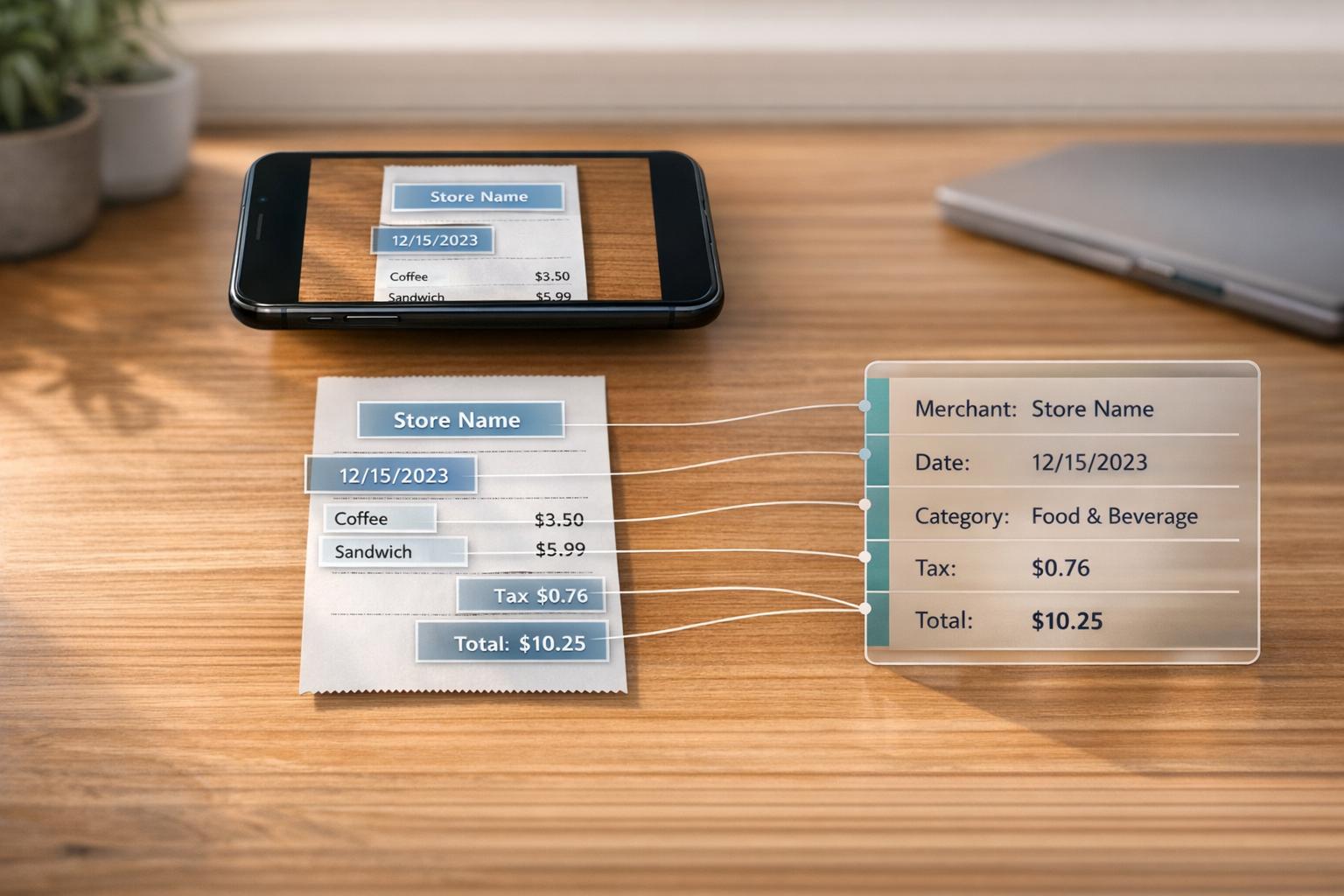
Manually entering receipt data wastes time and leads to errors. OCR (Optical Character Recognition) technology solves this by converting receipt images into editable, machine-readable text. Modern AI-powered OCR systems can extract key details like merchant names, transaction dates, and amounts with up to 99% accuracy. They also process data in seconds, reducing operational costs by up to 90% compared to manual entry.
Key Takeaways:
- Faster Processing: Automates receipt handling, cutting time by 80% and improving speed by 500%.
- Higher Accuracy: AI-driven OCR achieves 97–99% accuracy, far better than older systems.
- Cost Savings: OCR reduces costs by 40–75%, eliminating the need for manual data entry.
- Scalability: Handles large volumes effortlessly, even during peak times.
By using platforms like EasyTripExpenses, businesses can streamline workflows, improve accuracy, and save time and money.
Automatically Extract Data from Scanned Receipts | Intelligent Document Processing | Powered by OCR
sbb-itb-386cb5b
How OCR Extracts Data from Receipts
How OCR Extracts Data from Receipts: 3-Stage Process
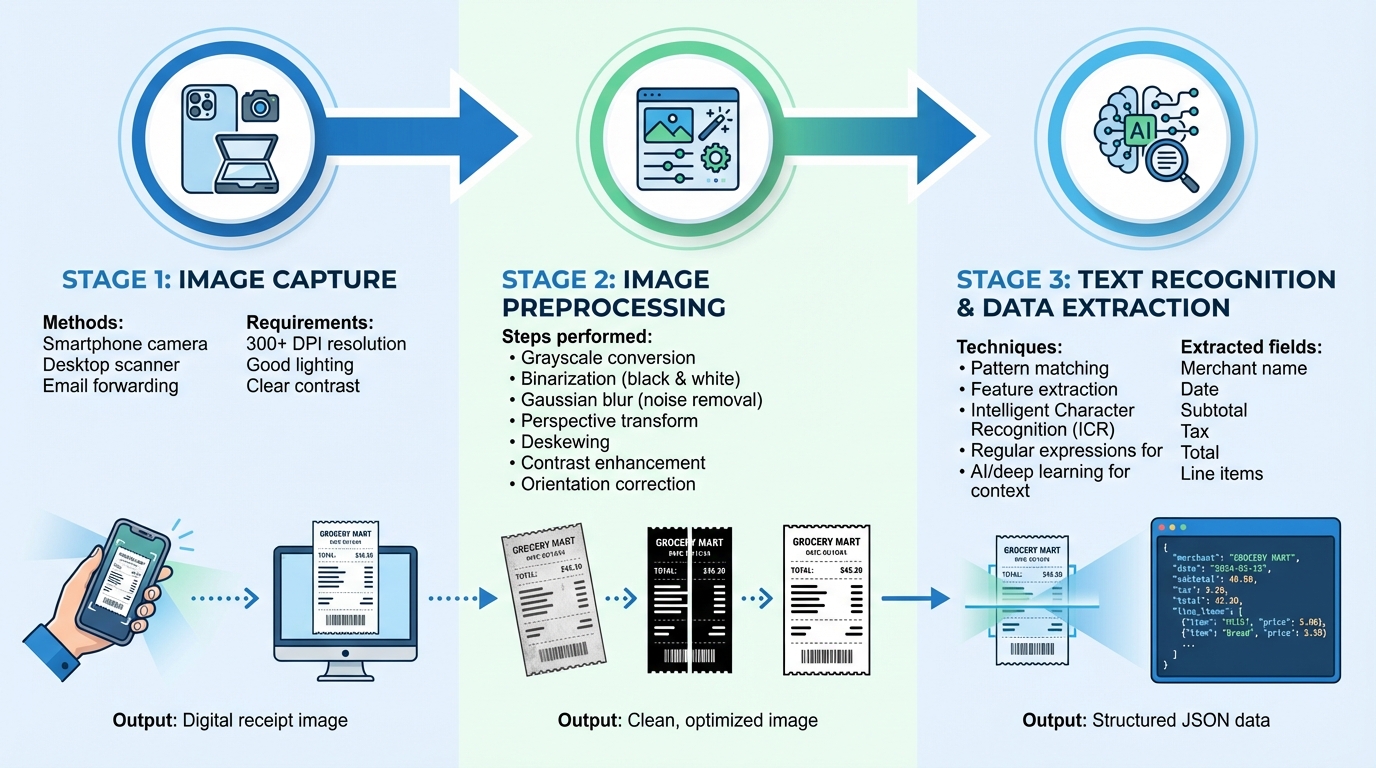
The process of Optical Character Recognition (OCR) for receipts involves three key stages: capturing the image, refining it for better clarity, and extracting the relevant data.
Image Capture
The first step is turning a physical receipt into a digital image. This can be done with a smartphone camera, a desktop scanner, or even by forwarding a digital receipt via email. High-resolution images (at least 300 DPI) are crucial for accuracy. Good lighting, minimal distortion, and ensuring the entire receipt fits within the frame all contribute to better results. The image should also have a clear contrast between the receipt and its background. Once captured, the image is ready for preprocessing to enhance clarity.
Image Preprocessing
Raw images of receipts often have issues like shadows, tilt, or background interference. Preprocessing addresses these problems to improve the accuracy of text recognition.
The first step is converting the image to grayscale, which simplifies the data and speeds up processing. Next, the image is binarized - converted to a high-contrast black-and-white format - making it easier for the OCR engine to distinguish text.
To remove random specks or noise, a Gaussian blur is applied. If the receipt was photographed at an angle, a perspective transform adjusts it to a straight, bird's-eye view. Other refinements include deskewing to straighten tilted text, enhancing contrast for faded receipts, and correcting orientation for sideways or upside-down images. These adjustments ensure the image is clean and ready for the OCR engine to extract text accurately.
Text Recognition and Data Extraction
With a preprocessed image, the OCR engine begins identifying characters and words. This involves several techniques. Pattern matching compares individual characters to stored font databases, while feature extraction examines elements like lines, loops, and intersections to recognize text across various fonts. Some advanced systems also use Intelligent Character Recognition (ICR), which employs neural networks to analyze text in a way that mimics human reading.
After recognizing the text, the system determines what each piece represents. Basic systems rely on regular expressions to identify patterns like prices ([0-9]+.[0-9]+) and filter out irrelevant information. More advanced systems use AI and deep learning to understand the context of the text, accurately identifying fields such as the merchant name, transaction date, subtotal, tax, and total amount.
The final data is structured in formats like JSON, making it easy to integrate with accounting tools or automated expense management platforms. Many modern OCR systems can go a step further, extracting detailed line-item data such as product descriptions, quantities, unit prices, and totals, offering a complete breakdown of the transaction.
Benefits of OCR for Expense Management
OCR technology is revolutionizing the way businesses handle receipts, offering faster, more accurate, and scalable solutions. By automating the extraction of data from receipts, it tackles the long-standing challenges that have slowed finance teams for years.
Faster Processing
Manual data entry often creates bottlenecks, especially as the number of transactions increases. OCR removes this hurdle by converting receipt images into structured data in just seconds. Automated OCR can cut receipt processing time by 80%, with businesses that adopt this technology reporting speed improvements of up to 500%.
This speed boost comes from several features. Employees can submit receipts effortlessly through mobile apps or email, where data is instantly added to expense reports. Batch processing allows hundreds of receipts to be handled simultaneously, making it perfect for busy periods. Some systems even provide "Straight-Through Processing" (STP), enabling receipts to go from capture to payment without any manual steps.
Better Accuracy
Manual entry is prone to errors that can lead to financial risks, policy breaches, and audit issues. OCR, particularly modern AI-driven solutions, significantly improves accuracy. While traditional pattern-matching OCR systems average around 64% accuracy, AI-powered OCR achieves rates between 97% and 99%. These advanced systems use machine learning to understand context, adapt to varying layouts, and even process handwritten information - tasks older technologies often struggle with.
Many platforms also assign confidence scores to extracted data, allowing finance teams to focus on reviewing only low-confidence entries instead of every receipt.
"When a receipt scanning app doesn't get the receipt right 99% of the time, people stop using the scanning functionality." - Daniel Vidal, CSO, Expensify
Handles Large Volumes
Scaling manual processes typically requires hiring more staff, which drives up costs. OCR eliminates this dependency. Cloud-based systems can automatically scale to handle increasing receipt volumes, even during peak times, without requiring additional hardware or personnel. Automated systems can manage fluctuating volumes seamlessly, ensuring high throughput during busy periods.
The cost savings are striking. Manual data entry costs an average of $20.09 per hour, while automated systems can cost as little as $40 per month for unlimited processing. This translates to an 80% to 90% reduction in operational expenses. Additionally, template-free extraction means businesses can process receipts from countless vendors without needing to configure the system for each new format.
| Feature | Manual Entry | Traditional OCR | AI-Powered OCR |
|---|---|---|---|
| Accuracy Rate | 73.1% - 99% | 64% - 85% | 97% - 99% |
| Processing Speed | Baseline | 3-5 seconds/doc | 2-3 seconds/doc |
| Volume Scaling | Requires more staff | Limited flexibility | Automatic scaling |
| Setup Required | None | Template-heavy | Template-free |
These advancements demonstrate how OCR technology, including solutions like EasyTripExpenses, is reshaping expense management with greater efficiency and cost-effectiveness.
Using OCR with EasyTripExpenses
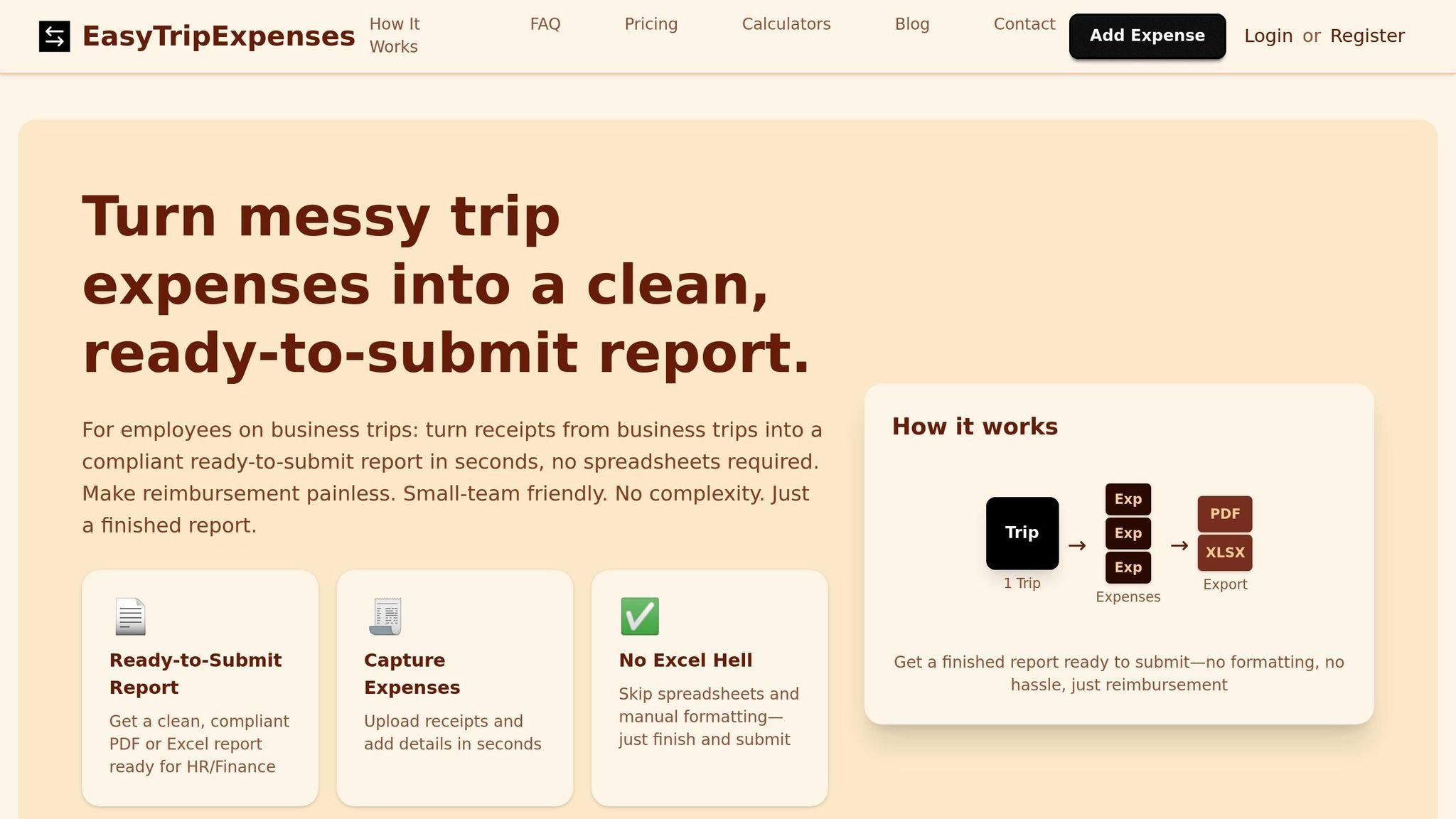
EasyTripExpenses uses OCR technology to make managing receipts effortless. Think of it as a digital set of eyes that scans receipt text and transforms it into machine-readable data, eliminating the need for manual entry. Whether it’s a gas station receipt or a hotel invoice, the platform takes care of the tedious work for you.
With this OCR functionality, EasyTripExpenses is designed specifically for business expense management. Users can upload receipts through the mobile app, email, or cloud storage, and the OCR engine instantly extracts key details like merchant name, transaction date, total amount, currency, and tax information.
What sets EasyTripExpenses apart is its AI-driven OCR, which understands context and automatically categorizes expenses by vendor and type - whether it’s meals, travel, or lodging. There’s no need to set up templates, so a receipt from a New York deli is handled just as efficiently as one from a tech conference in San Francisco. This smooth process not only simplifies expense tracking but also helps businesses save on costs.
"OCR technology acts like a digital pair of eyes, scanning the text on a receipt and converting it into machine-readable data." - Parser Expert
The platform delivers structured data that integrates easily into your workflows. After categorization, you can add comments, apply multi-currency reporting conversions, and generate reports in PDF or Excel formats - no IT expertise required. For businesses that process receipts frequently, this can reduce operational costs by 40–75% compared to manual data entry.
OCR Challenges and Solutions
Even the most advanced OCR systems run into challenges when dealing with real-world scenarios, especially when scanning receipts. Poor-quality images caused by dim lighting, crumpled paper, faded ink, or blurry smartphone photos can significantly disrupt text recognition. Other factors, like receipts photographed at odd angles, shadows obscuring details, handwritten tips, or multilingual text, add even more complexity. To overcome these hurdles, modern OCR systems rely on advanced preprocessing techniques and adaptive algorithms.
Traditional pattern-matching OCR systems, which often achieve only about 64% accuracy, struggle to handle the variability of real-world receipts. However, modern solutions address these issues with preprocessing techniques like deskewing (correcting alignment), despeckling (removing digital noise), and fine-tuning brightness and contrast before the text extraction process begins. AI-powered OCR systems have pushed accuracy to 85–95%, while systems using large language models (LLMs) like GPT or Claude can reach an impressive 97–99% accuracy by understanding the context of the text rather than relying solely on pattern recognition.
The challenge of OCR accuracy is well-documented:
"Even the best OCR in the world only gets a receipt right around 85% of the time... those [crumpled receipts] are the receipts where OCR fails and gets the information wrong." - Daniel Vidal, CSO, Expensify
When automated methods hit their limits, advanced systems often include a backup plan. For instance, some systems employ human validators to review and correct OCR outputs when confidence levels are low, ensuring near-perfect accuracy.
For the best OCR results, ensure receipts are captured at a minimum of 300 DPI, free from shadows and glare, and as flat as possible to avoid wrinkles. Once the image is captured, automated preprocessing steps like alignment correction, noise removal, and contrast adjustment take over. Following these guidelines helps OCR systems deliver consistent, reliable data for smooth expense management workflows by avoiding common reporting errors.
Conclusion
OCR technology has reshaped receipt data extraction, replacing the grind of manual entry with efficient automation. Modern AI-powered OCR systems now boast accuracy rates of up to 99%, a significant leap from the roughly 64% achieved by traditional methods. This dramatic improvement translates into measurable operational advantages.
Businesses adopting automated receipt processing report cost savings of up to 85% and processing speeds that are 500% faster compared to manual workflows. As Miki Palet explains:
"By automating receipt capture, you're not just digitizing paper; you're unlocking real-time visibility into your company's spending, empowering your team to make smarter, data-driven decisions on the fly".
This shift from manual delays to real-time insights allows businesses to manage budgets with greater agility and precision.
Platforms like EasyTripExpenses harness these OCR advancements to simplify expense reporting from start to finish. Receipts are transformed into polished, professional reports without requiring any technical expertise or IT setup. Looking ahead, the platform’s upcoming Pro features will even automate expense completion directly from uploads, further streamlining the process. By embedding OCR technology into expense management workflows, businesses can now achieve faster, more accurate reporting with minimal effort.
While challenges like poor lighting or crumpled receipts can still impact results, using high-quality image capture and AI-driven preprocessing ensures reliable accuracy. Following best practices for receipt photography and relying on systems with built-in validation can mitigate these issues. Today, automated receipt processing isn’t just a convenience - it’s a necessity for businesses aiming to cut administrative overhead and maintain precise financial records.
FAQs
How does OCR technology make receipt processing more accurate?
OCR, or Optical Character Recognition, improves the accuracy of receipt processing by leveraging AI-powered algorithms and machine learning models to extract data with impressive precision. These systems typically deliver accuracy rates between 85-95%, and with advanced tools, they can reach as high as 97-99% under ideal conditions.
By automating the data extraction process, OCR significantly reduces errors caused by issues like poor image quality, manual entry slip-ups, or variations in receipt formats. This automation leads to quicker and more dependable processing, saving valuable time while lowering the chances of mistakes in expense reporting.
What steps should I take to prepare receipts for accurate OCR data extraction?
To get accurate OCR data from receipts, start with clear, high-quality images. Ensure the receipts are well-lit, free from wrinkles or smudges, and captured in a way that minimizes distortion. The OCR software should also handle receipts photographed at different angles - whether sideways or upside down - without needing you to manually adjust them.
It’s also important to choose OCR tools that can adapt to different receipt formats and improve their recognition capabilities over time. This way, the system remains efficient and dependable as your requirements change. Combining good image preparation with advanced OCR software can greatly improve the accuracy and speed of receipt data extraction.
What are the best practices for capturing high-quality receipt images for OCR?
To get the most accurate results when extracting receipt data using OCR, businesses should focus on capturing high-quality images. Here are some practical tips:
- Good lighting is key: Take photos in well-lit areas to eliminate shadows or glare that might obscure the text.
- Keep receipts flat and tidy: Smooth out any wrinkles and ensure there are no smudges, stains, or other marks covering the information.
- Align receipts correctly: Make sure receipts are positioned upright and avoid taking photos at awkward angles.
- Stick to supported file formats: Use widely accepted formats like PDF, JPG, or PNG. Ensure the resolution is clear, with file sizes ranging between 50 KB and 10 MB for optimal performance.
By following these steps, businesses can improve OCR accuracy, minimize data errors, and make expense tracking more efficient.